

A fully integrated payments solution for WooCommerce stores
Built by Woo, for WooCommerce. Securely accept major credit cards, debit cards, and local payment methods on your site with no setup costs or monthly fees.
Save 10% on processing fees!
Simplify your payments — for less. Sign up for WooPayments and save 10% on payment processing costs for the first 3 months! Merchants must meet eligibility requirements. Limited-time offer; terms and conditions apply.
Klarna, Afterpay, and Affirm are now available in WooPayments!
Increase your average order value, convert more sales, and give customers real buying power when you offer the world’s favorite buy now, pay later (BNPL) options at checkout — all from one fully integrated dashboard.
Available in:
- Australia
- Austria
- Belgium
- Bulgaria
- Canada
- Croatia
- Cyprus
- Czech Republic
- Denmark
- Estonia
- Finland
- France
- Germany
- Greece
- Hong Kong
- Hungary
- Ireland
- Italy
- Japan
- Latvia
- Lithuania
- Luxembourg
- Malta
- Netherlands
- New Zealand
- Norway
- Poland
- Portugal
- Romania
- Singapore
- Slovakia
- Slovenia
- Spain
- Sweden
- Switzerland
- United Arab Emirates
- United Kingdom
- United States
All of your store’s transactions in one place
With WooPayments, you can collect payments, track cash flow, handle disputes, and manage recurring revenue directly from your store’s dashboard — without needing to log into a third-party platform.
WooPayments simplifies payment processing for you and your customers, freeing up more time to focus on growing your business. This fully integrated solution is the only payment method designed exclusively for WooCommerce, by Woo.
What are the benefits for me?
- Get started for free—pay-as-you-go fees per transaction. There are no monthly fees, either. Learn more about our fees.
- Unlike other gateways, WooPayments doesn’t charge extra for tools like saved credit cards, Card Account Updater, Adaptive Acceptance, and 3D Secure that enhance security and drive more revenue.
- Try Tap to Pay or order a card reader that syncs with your inventory through WooPayments. Learn more about Tap to Pay on iPhone and Android.
- Multi-currency support is built in. Accept payments in 135+ currencies using WooPayments.
- Responsive checkout design. Crafted to look great on almost any website, for both desktop and mobile browsers.
- Increase conversions by enabling payment methods including WooPay, Apple Pay®, Google Pay, iDeal, P24, EPS, and Bancontact.
- PCI compliance. Payment data is securely tokenized and never stored on your site.
- Enable buy now, pay later (BNPL) in one click. Sell more and reach new customers with top BNPL options built into your dashboard (not available in all geographies).
- 3DS/SCA compatible. Helps prevent fraud by authenticating 3D Secure cards during checkout.
- Integrated fraud protection. Detects suspect transactions with Stripe Radar or your own advanced protection rules.
- Simplify your workflow. No more logging into third-party payment processor sites – manage everything from the comfort of your store’s dashboard.
- Set a custom payout schedule to get your funds into your bank account as often as you need — daily, weekly, monthly, or even on-demand.
- Reduce cart abandonment with a streamlined checkout flow.
- Stay on top of chargebacks, disputes, and refunds thanks to the integrated dashboard.
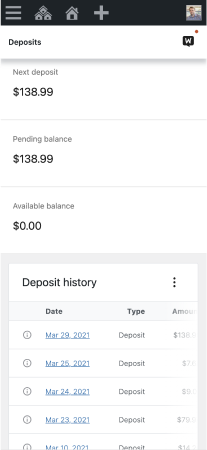
Deposit history
What are the benefits for my customers?
- Customers pay directly on your store instead of being redirected to a third-party checkout page— a seamless experience resulting in fewer abandoned carts.
- They can see prices and pay in their preferred currency — no more checking conversion rates or manual price calculations.
- Customers can save their credit card details for faster checkouts in the future.
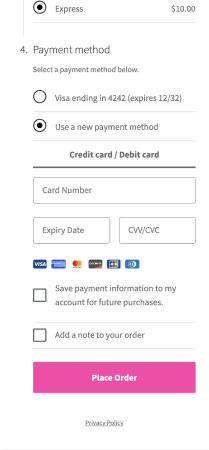
Payment method entry
Earn recurring revenue with WooPayments and Subscriptions
By adding WooCommerce Subscriptions to the mix, you can increase your bottom line and harness the power of recurring revenue.
Whether you’re selling memberships, accepting installments, or making it simpler for customers to reorder their favorite products, WooPayments’ integrated dashboard makes managing subscription payments a breeze. View information about renewals and cancellation data, plus date changes and payment methods.
Get paid within minutes with Instant Payouts.
Stay flexible with immediate access to your funds when you need them. With WooPayments’ new Instant Payouts feature, transfer your earnings to a debit card within minutes — including nights, weekends, and holidays.
Eligible merchants can receive a payout of their pending balance at a cost of just 1.5% of the payout amount without affecting their regular payout schedule.
Learn more about Instant Payouts eligibility. Only available in the US.
Convenient sorting, detailed payouts, and quick refunds
Dig into the details of each transaction, and sort or filter transactions by type, date, amount, fees, and net revenue.
Quickly access payout information, see details of previous and estimated payouts, and keep track of the transactions associated with them.
Process refunds in a snap, returning all or part of a charge to the card your customer used to purchase.
Get paid with WooPayments
- Add WooPayments to your cart and check out.
- Download, install, and activate the extension in your WooCommerce store.
- Once the extension is active, click WooCommerce > Payments in your store’s WP Admin.
- Click Get Started.
- Complete the onboarding process to create your account and verify your business details with Stripe.
- That’s it — you’re ready to get paid with WooPayments. Happy selling!